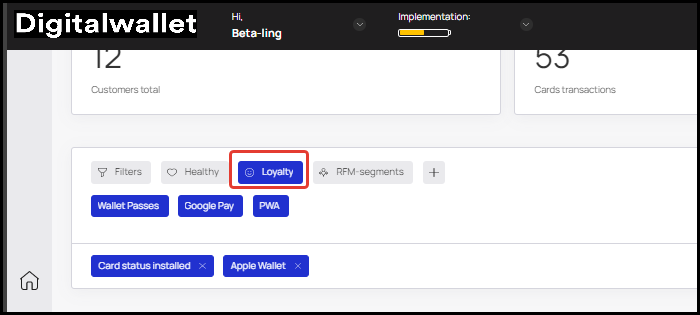
Overview of the customer base filtration options
Customer filtration by parameters and filter groups have been added to the customer base
1. Filters include the following parameters:
Card balance
Device type
Card serial number
Card status
UTM-tag
Current number of uses
Registration date
Gender
Name
Phone
Unused rewards
Number of stamps
Customer birthday

Filters can overlap on an AND/OR condition.

Filter can include:
comparison to a specific value (string, number, etc.): equal, not equal, more, less, etc.
entering a range of values: e.g. date from – date to
entering an array of values: equal to one from the list
For example, the “Card balance” filter

1. Filter Groups are ready-to-use presets based on filters. Each filter in a group can be applied individually or combined
There are currently 3 groups of filters, but they will be added quickly.
The first filter group “RFM – segments” is a method of analysis that allows you to segment customers based on two variables – duration and frequency of visits.
The following visit periods are included in the analysis:
0 to 30 days:
Number of visits from 0 to 3: RFM – Beginners
Number of visits from 4 to 7: RFM – Growths
Number of visits from 8 to 12: RFM – Champions
31 to 60 days:
Number of visits 0 to 3: RFM – Doubtful
Number of visits from 4 to 7: RFM – Medium (borderline)
Number of visits from 8 to 12: RFM – Loyal – Regular
61 to 90 days:
Number of visits 0 to 3: RFM – Sleeping
Number of visits from 4 to 7: RFM – At risk
Number of visits from 8 to 12: RFM – Needs attention

“Health” group contains filters that can be used to sort clients with missing data/not installed cards:
Card status not installed
Unknown gender
Empty birthday

The “Loyalty” filter group includes filters:
Card status installed
Apple Wallet
Wallet Passes
Google Pay
PWA